


 JOIN OUR WHATSAPP CHANNEL























































Learn How to Change and Customise Your Homepage in Google Chrome on PC
Learn how to locate and remove malware from your smartphone, as well as how to reclaim your settings.





Changing the homepage in Google Chrome and customizing it is fairly a simple task. Google Chrome makes things simpler to set your email inbox's homepage as well as the sites you prefer or add to your favourites. The start-up page is not the same as the homepage. The page that appears when you first open Chrome on your device is your starting page. When you click Home Home, you'll be taken to your homepage.
You may have undesirable software if your startup page, homepage, or search engine has abruptly changed. Learn how to locate and remove malware from your smartphone, as well as how to reclaim your settings.
How to Change Homepage in Google Chrome
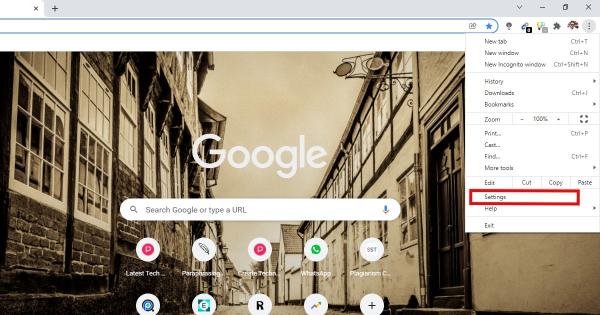
In Chrome, click the three-dot icon in the top-right corner of a browser window to change your homepage. Then go to Appearance > Settings > Show Home Button to enable it. Finally, type a URL into the text box and hit the home button to see if it has been modified.


How to Customize Homepage in Google Chrome
Step 1: In the Chrome web browser, create a new tab.
Step 2: Then select Customize menu, this button is located at the bottom-right corner of the window. It could also simply be a pencil icon.

Step 3: Then, on the left sidebar, select Background. You can choose a new background image, a solid colour, or upload your own image with this option.

Step 4: After that, go to Shortcuts. This option allows you to edit or hide the shortcut icons on your new tab page.

Step 5: After that, choose a colour scheme and a theme. You can use this option to alter the colour of your entire browser, as well as specific websites.

Step 6: After you've changed the new tab page, click Done.
You can simply customise and alter the homepage of Google Chrome on your PC by following these simple instructions.
For more tech-related news subscribe to our YouTube Channel if you haven’t done it yet.









